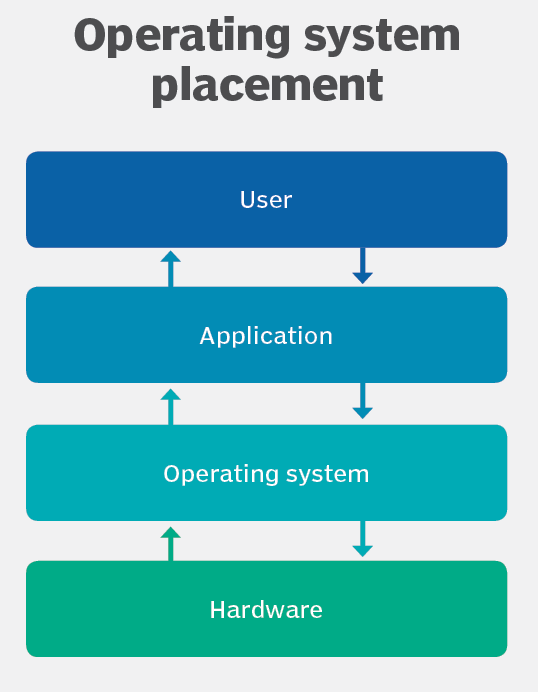
An Operating System is the program that, after being initially loaded into the computer by a boot program, manages all of the other application programs in a computer. The application programs make use of the operating system by making requests for services through a defined application program interface (API). In addition, users can interact directly with the operating system through a user interface, such as a command-line interface (CLI) or a graphical UI (GUI).
Why use an Operating System ?
An operating system brings powerful benefits to computer software and software development. Without an operating system, every application would need to include its own UI, as well as the comprehensive code needed to handle all low-level functionality of the underlying computer, such as disk storage, network interfaces and so on.
An operating system (OS) is used to manage and control the hardware and software resources of a computer. It provides a user interface, supports applications, and acts as an intermediary between the hardware and the software. It provides services such as memory management, process management, and file management to ensure the smooth functioning of the computer.

Functions of Operating System
An operating system provides three essential capabilities: It offers a UI through a CLI or GUI; it launches and manages the application execution; and it identifies and exposes system hardware resources to those applications — typically, through a standardized API.
UI:
Every operating system requires a UI, enabling users and administrators to interact with the OS in order to set up, configure and even troubleshoot the operating system and its underlying hardware. There are two primary types of UI available: CLI and GUI
The CLI, or terminal mode window, provides a text-based interface where users rely on the traditional keyboard to enter specific commands, parameters and arguments related to specific tasks. The GUI, or desktop, provides a visual interface based on icons and symbols where users rely on gestures delivered by human interface devices, such as touchpads, touchscreens and mouse devices.
The GUI is most frequently used by casual or end users that are primarily interested in manipulating files and applications, such as double-clicking a file icon to open the file in its default application. The CLI remains popular among advanced users and system administrators that must handle a series of highly granular and repetitive commands on a regular basis, such as creating and running scripts to set up new personal computers (PCs) for employees.
Application management. An operating system handles the launch and management of every application. This typically supports an array of behaviors, including timesharing multiple processes, or threads. so that various tasks can share the available processors’ time; handling interruptions that applications produce to gain a processor’s immediate attention, ensuring there is enough memory to execute the application and its corresponding data without interfering with other processes; carrying out error handling that can gracefully remove an application’s processes; and performing memory management without disrupting other applications or the OS.
An operating system can also support APIs that enable applications to utilize OS and hardware functions without the need to know anything about the low-level OS or hardware state. As an example, a Windows API can enable a program to obtain input from a keyboard or mouse; create GUI elements, such as dialog windows and buttons; read and write files to a storage device; and more. Applications are almost always tailored to use the operating system on which the application intends to run.
Device management. An operating system is responsible for identifying, configuring, and providing applications with common access to underlying computer hardware devices. As the OS recognizes and identifies hardware, the OS will install corresponding device drivers that enable the OS and applications running on the OS to use the devices without any specific knowledge of the hardware or devices.
Operating system types and examples
Although the fundamental roles of an operating system are ubiquitous, there are countless operating systems that serve a wide range of hardware and user needs.
General-purpose operating system. A general-purpose OS represents an array of operating systems intended to run a multitude of applications on a broad selection of hardware, enabling a user to run one or more applications or tasks simultaneously. A general-purpose OS can be installed on many different desktop and laptop models and run applications from accounting systems to databases to web browsers to games. General-purpose operating systems typically focus on process (thread) and hardware management to ensure that applications can reliably share the wide range of computing hardware present.
Common desktop operating systems include the following:
- Windows is Microsoft’s flagship operating system.
- Mac OS is the operating system for Apple’s Macintosh line of PCs and workstations.
- Unix is a multiuser operating system designed for flexibility and adaptability.
- Linux is a Unix-like operating system that was designed to provide PC users a free or low-cost alternative.
Mobile operating system. Mobile operating systems are designed to accommodate the unique needs of mobile computing and communication-centric devices, such as smartphones and tablets. Mobile devices typically offer limited computing resources compared to traditional PCs, and the OS must be scaled back in size and complexity in order to minimize its own resource use, while ensuring adequate resources for one or more applications running on the device. Mobile operating systems tend to emphasize efficient performance, user responsiveness and close attention to data handling tasks, such as supporting media streaming. Apple iOS and Google Android are examples of mobile operating systems.
Embedded operating system. Not all computing devices are general purpose. A huge assortment of dedicated devices — including home digital assistants, automated teller machines (ATMs), airplane systems, retail point of sale (POS) terminals and internet of things (IoT) devices — includes computers that require an operating system. The principal difference is that the associated computing device only does one major thing, so the OS is highly stripped down and dedicated to both performance and resilience. The OS should run quickly, not crash, and handle all errors gracefully in order to continue operating in all circumstances. In most cases, the OS is provided on a chip that is incorporated into the actual device. A medical device used in a patient’s life support equipment, for example, will employ an embedded OS that must run reliably in order to keep the patient alive. Embedded Linux is one example of an embedded OS.
Network operating system. A network operating system (NOS) is another specialized OS intended to facilitate communication between devices operating on a local area network (LAN). A NOS provides the communication stack needed to understand network protocols in order to create, exchange and decompose network packets. Today, the concept of a specialized NOS is largely obsolete because other OS types largely handle network communication. Windows 10 and Windows Server 2019, for example, include comprehensive networking capabilities. The concept of a NOS is still used for some networking devices, such as routers, switches and firewalls, and manufacturers may employ proprietary NOSes, including Cisco Internetwork Operating System (IOS), RouterOS and ZyNOS.
.
 Umesh Chandra
Leave a comment